Identity Fusion NG
Disclaimer: Identity Fusion NG is the newest Identity Fusion version and supersedes any Identity Fusion v1.x previous release. Version 1.x is now deprecated. For those needing to upgrade an existing deployment, please refer to the migration guide.
Documentation
- Full documentation site: GitHub Pages
- Source docs in this repository: documentation folder
- Start here for the core concepts and architecture: Identity Fusion NG Framework
Identity Fusion NG is an Identity Security Cloud (ISC) connector that consolidates account data from one or more managed sources, lets you map attributes into a single Fusion account schema, define derived and unique values (including Velocity-based computation), and optionally match new or changed accounts to existing identities so you can avoid duplicate identities without brittle exact-match correlation alone.
When to use it
- You need consistent attributes across messy or multi-source account data before correlation.
- You need generated or normalized identifiers (unique IDs, UUIDs, counters, formatted strings) that standard sources do not provide.
- You need similarity-based matching and optional manual review when authoritative correlation rules are not enough.
Read next
| Step | Resource |
|---|---|
| Shortest path to a first aggregation | Get started |
| How Map → Define → Match fits together | Concepts: map, define, and match |
| Full guide list | Guides overview |
| Connector operations (APIs ISC calls) | Connector operations reference |
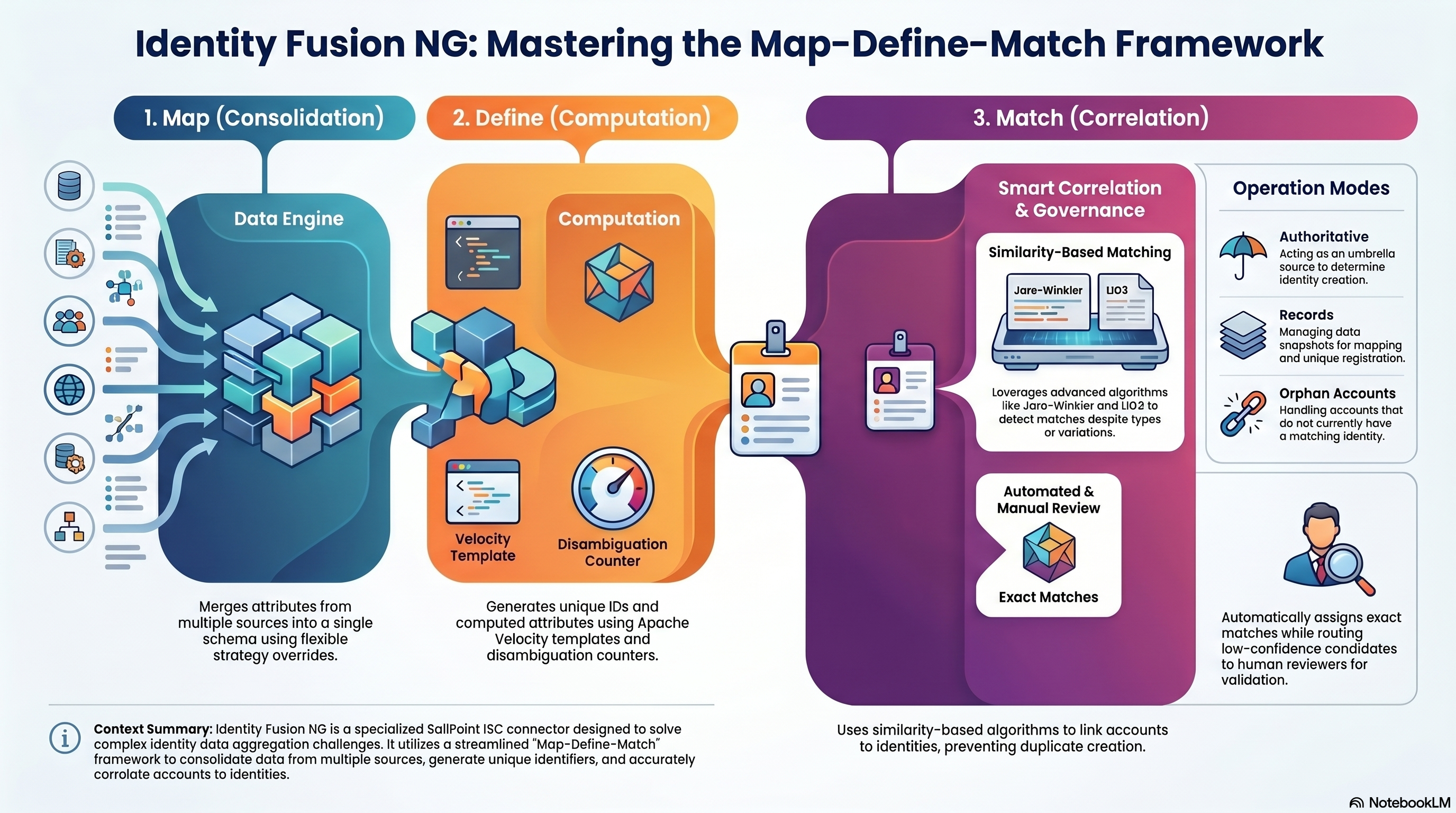
Identity Fusion NG addresses the complex challenge of identity and account data aggregation through a streamlined map-define-match framework. This concept represents the high-level operation of the connector, which can execute all three steps or just one, but always in this logical sequence:
The Map, Define, Match Framework
The Three Pillars Map your attributes from different sources and accounts to align with your identity schema. Define new attributes from the existing ones, like unique identifiers, normalised versions of the original attributes and other powerful transformations. Finally, match your new accounts with existing identities to avoid creating duplicates, using all the previously processed attributes with a series of comparison algorithms to pick and choose.
- Map (Consolidation) Map your attributes from different sources and accounts to align with your identity schema. Strict correlation often fails when data is inconsistent. Creating, normalizing, and combining attributes from multiple sources is complex. The connector provides flexible merging strategies when multiple sources contribute to the same attribute (first found, list, concatenate, or source preference).
- Define (Unique identifiers / Computation) Define new attributes from the existing ones, like unique identifiers, normalised versions of the original attributes and other powerful transformations. ISC has no built-in way to generate unique identifiers and handle value collision. The connector provides powerful attribute definition using Apache Velocity templates, unique ID generation with disambiguation counters, immutable UUID assignment, and computed attributes.
- Match (Matching / Correlation) Match your new accounts with existing identities to avoid creating duplicates, using all the previously processed attributes with a series of comparison algorithms to pick and choose. The connector provides similarity-based match detection comparing the resulting mapped and defined Fusion accounts against your identity baseline. It offers optional manual review workflows and configurable merging of account attributes.
Map, Define, Match Framework
Operation Modes
Identity Fusion NG features three distinct operation modes:
- Authoritative accounts
- Records
- Orphan accounts
Deployment Architecture The connector can be used side by side with any sources except when the goal is matching authoritative accounts to avoid duplication, in which case it acts like an umbrella of any source it manages and replaces the identity profile with its own.
You can use the map, define, and match capabilities independently or together. For matching, the Identity Fusion NG source should be authoritative in most cases—so it can determine which incoming managed accounts create a new identity and which correlate to an existing one. For mapping and defining only (unique IDs, calculated or consolidated attributes), Fusion is rarely configured as authoritative; adding managed account sources is optional and depends on your Map requirements.
Reference: configuration at a glance
Configuration is grouped into menus in the connector source in ISC. Each menu contains multiple sections with specific settings.
Connection Settings
Authentication and connectivity to the ISC APIs.
Connection Settings
| Field | Description | Required | Notes |
|---|---|---|---|
| Identity Security Cloud API URL | Base URL of your ISC tenant | Yes | Format: https://<tenant>.api.identitynow.com |
| Personal Access Token ID | Client ID from your PAT | Yes | Must have required API permissions for sources, identities, accounts, workflows/forms |
| Personal Access Token secret | Client secret from your PAT | Yes | Keep secure; rotate as needed |
| API request retries | Maximum retry attempts for failed API requests | No (shown when retry is enabled) | Default: 20; also configurable from Advanced Settings |
| Requests per second | Maximum API requests per second (throttling) | No (shown when queue is enabled) | Default: 8; also configurable from Advanced Settings |
Note: API request retries and Requests per second also appear in Advanced Settings → Advanced Connection Settings. They control the same underlying settings; Connection Settings provides quick access, while Advanced Settings groups them with related queue and retry options.
Tip: Create a dedicated identity for Identity Fusion and generate a PAT for your source configuration.
Source Settings
Controls which identities and sources are in scope and how processing is managed.
For an in-depth explanation of source types, aggregation rules, correlation modes, and account lifecycle, see the Source configuration guide.
| Section | Description |
|---|---|
| Scope | Determines if identities are included in the processing scope and defines an optional identity filter query. |
| Sources | Configures authoritative sources, source behavior, aggregation/correlation modes, plus dual account filters: Accounts API filter (server-side) and Accounts JMESPath filter (client-side, page-wise). |
| Processing Control | Manages history retention, empty account deletion, and behavior when unique identifiers are missing. |
Note: Managed machine accounts (
isMachine=true) are not supported by Identity Fusion NG. The connector skips them during managed-account ingestion and logs warning messages with discarded counts.Filter references: Accounts list API, JMESPath.
Source behavior note: for sources of type Records, Include record accounts in Match can be turned off to run Map/Define and unique registration without Match scoring. See the per-source options in Source configuration.
Attribute Mapping Settings
Controls how source account attributes are mapped into the Fusion account and how values from multiple sources are merged.
Attribute Mapping Settings
Attribute Mapping Definitions Section
| Field | Description | Required | Notes |
|---|---|---|---|
| Default attribute merge from multiple sources | Default method for combining values from different sources | Yes | Options: First found (first value by source order), Keep a list of values (distinct values as array), Concatenate different values (distinct values as [a] [b] string) |
| Attribute Mapping | List of attribute mappings | No | Each mapping defines how source attributes feed a Fusion attribute |
Per-attribute mapping configuration:
Attribute Mapping Settings - Per-attribute mapping configuration
| Field | Description | Required | Notes |
|---|---|---|---|
| New attribute | Name of the attribute on the Fusion account | Yes | Will appear in the discovered schema |
| Existing attributes | List of source attribute names that feed this attribute | Yes | Names must match source account schema (case-sensitive) |
| Default attribute merge from multiple sources (override) | Override default merge for this specific mapping | No | Same options as default, plus Source name (use value from specific source) |
| Source name | Specific source to use for this attribute | Yes (when merge=source) | Takes precedence when multiple sources have values |
Tip: You can use mapping settings to predefine an attribute and redefine the same attribute using attribute definition. The mapped value is available to the definition expression.
Tip: Concatenated attributes are displayed in alphabetical order and duplicate values are removed. They can sometimes be good candidates for matching.
Tip: You can keep all values found for a given attribute and generate a multi-valued attribute. You can get a comma-separated list of them if the schema attribute in question is not multi-valued.
Attribute Definition Settings
Controls how attributes are defined (Define step), including unique identifiers, UUIDs, counters, and Velocity-based computed attributes.
Attribute Definition Settings
Attribute Definition Settings Section
| Field | Description | Required | Notes |
|---|---|---|---|
| Maximum attempts for unique definition | Maximum attempts to define a unique value before giving up | No | Default: 100; prevents infinite loops with unique/UUID types |
| Attribute Definitions | List of attribute definition rules | No | Each definition specifies how an attribute is built |
Per-attribute definition configuration:
Attribute Definition Settings - Per-attribute definition
| Field | Description | Required | Notes |
|---|---|---|---|
| Attribute Name | Name of the account attribute to define | Yes | Will appear in the discovered schema |
| Apache Velocity expression | Template expression to define the attribute value | No | Context includes: mapped account attributes, $accounts, $sources, $previous, optional $identity, $originSource, $originAccount (id), $account (origin snapshot object), plus $Math, $Datefns (format, parse, add/sub days/months/years, isBefore, isAfter, differenceInDays, etc.), $AddressParse (getCityState, getCityStateCode, parse), and $Normalize (date, phone, name, fullName, ssn, address). Example: #set($initial = $firstname.substring(0, 1))$initial$lastname |
| Case selection | Case transformation to apply | Yes | Options: Do not change, Lower case, Upper case, Capitalize |
| Attribute Type | Type of attribute | Yes | Normal (standard attribute), Unique (must be unique across accounts; counter added if collision), UUID (generates immutable UUID), Counter-based (increments with each use) |
| Counter start value | Starting value for counter | Yes (counter type) | Example: 1, 1000, etc. |
| Minimum counter digits ($counter) | Minimum digits for counter (zero-padded) | Yes (counter/unique types) | Example: 3 → 001, 002; for unique type, counter is appended on collision |
| Maximum length | Maximum length for defined value | No | Truncates to this length; for unique/counter types, counter is preserved at end |
| Normalize special characters? | Remove special characters and quotes | No | Useful for IDs and usernames |
| Remove spaces? | Remove all spaces from value | No | Useful for IDs and usernames |
| Trim leading and trailing spaces? | Remove leading/trailing whitespace from value | No | Cleans up extra whitespace from source data |
| Refresh on each aggregation? | Recalculate value every aggregation | No | Only available for Normal type; unique/UUID/counter preserve state |
Note: When an account is enabled, all attributes (including unique) are force refreshed and recalculated (internal mechanism to reset unique attributes).
Tip: If you want to change a unique attribute other than the account name or ID, you can disable the Fusion account and re-enable it. This is handy in situations where a surname change affects a username, etc.
Tip: When dealing with multiple managed sources, generate your own Fusion account ID (
nativeIdentity) and name, and ensure both are unique. Two Fusion accounts with the same name correlate to the same identity. In fact, any account evaluated for correlation is automatically correlated to an identity whose name (not username) matches. An identity name is defined by the name of the account that originated it. Only the last Fusion account returned from a list of Fusion accounts with the same ID is processed.Tip: Do not use a unique attribute or username that you may want to reset down the line as the Fusion account name. Use any other account attribute, and reserve your account name for an immutable unique attribute that is as human-friendly as possible.
Tip: Use attribute normalizers (
$Normalize) to align different formats across different sources.Tip: You can define extra attributes in your configuration and not include them in your schema. You can use them as ephemeral support attributes to create new ones. Remember that previously processed attributes are available to the next ones. All normal attributes are available to unique attributes, as these are the last ones to be processed. Don't use a unique attribute in your matching settings, as it won't be available on the managed account being processed at runtime.
Tip: Remember that normal attributes are automatically refreshed when new data is found. You don't need to force global or individual attribute refresh unless there's a good reason, like troubleshooting, testing, or if the attribute definition is time-sensitive.
Note: In Velocity context, managed account snapshots (
$accountsand$sources) include each source account’s**attributes**plus**_id**(composite managed keysourceId::nativeIdentity), nested**source**(id,name— ISC source id and name on managed rows), nested**schema**(id= native identity,name= display name from ISCname/nativeIdentity), and**IIQDisabled**(IdentityIQ-style disabled flag wheretruemeans disabled). The same composite key is available as top-level**$originAccount**for the origin only — it is the row’s**_id**on managed snapshots. Identity-backed rows (when the origin is Identities) use**source.name**=Identities(nosource.id) and the same**schema**shape for display name and id.$accountsis deterministic: sources follow configured order, accounts keep insertion order within each source, and non-configured sources are appended.**$account**is the origin snapshot (managed shape or identity-backed when the origin isIdentities).
Attribute Matching Settings
Controls Match behavior, including similarity matching and manual review workflows.
Matching Settings Section
Attribute Matching Settings - Matching
| Field | Description | Required | Notes |
|---|---|---|---|
| Minimum combined match score [0-100] | Global floor for the weighted combined match score | Yes | Typical range: 70-90; higher = stricter. The combined score is a weighted blend of per-attribute similarities; each rule’s minimum similarity is also its weight (higher minimum = more influence). |
| Automatically assign on exact match? | Assign to the matched identity without review when every real rule scores 100 and none were skipped | No | Skips manual review only for an exact attribute match: all configured rules evaluated at 100% similarity with no rules skipped for missing values. |
| Fusion attribute matches | List of identity attributes to compare for match detection | Yes | At least one attribute match required; each match specifies an attribute and algorithm |
Per-attribute match configuration:
Attribute Matching Settings - Matching - Per attribute matching
| Field | Description | Required | Notes |
|---|---|---|---|
| Attribute | Identity attribute name to compare | Yes | Must exist on identities in scope |
| Matching algorithm | Algorithm for similarity calculation | Yes | Enhanced Name Matcher (person names, handles variations), Jaro-Winkler (short strings with typos, emphasizes beginning), LIG3 (Levenshtein-based with intelligent gap penalties, excellent for international names and multi-word fields), Dice (longer text, bigram-based), Double Metaphone (phonetic, similar pronunciation), Custom (from SaaS customizer) |
| Similarity threshold & weight [0-100] | Per-rule similarity threshold and blend weight | Yes | Values must meet this minimum for the rule to pass. The same value weights the rule in the combined match score (stricter rules count more). Use 0 only if you need minimal weight; it is treated as weight 1 in the blend. |
| Mandatory match | Rule must pass for a potential match | No | When Yes: similarity must be ≥ this rule’s minimum or the candidate is rejected, regardless of combined score. Passing mandatory rules still contribute to the weighted combined score like other rules. |
| Skip match if missing | Skip rule when one side is missing | No | Default: Yes. Skipped rules do not affect the combined score. Automatic assignment on exact match requires no skipped rules and every evaluated score at 100. |
Tip: Use Fusion reports to fine-tune your matching thresholds and algorithms.
Tip: Remember that mandatory match configurations scoring below their threshold invalidate the match. Add them to the top of the list to avoid unnecessary overhead.
Note: During managed-account analysis, Identity Fusion evaluates identity-backed candidates first. Match evaluations against newly discovered unmatched Fusion accounts are only executed when no identity-backed match is found. If such a match is detected, it is logged/reported as deferred and no ISC account is emitted for that path until a later aggregation correlates that Fusion account to an identity.
Review Settings Section
Attribute Matching Settings - Review
| Field | Description | Required | Notes |
|---|---|---|---|
| List of identity attributes to include in form | Attributes shown on manual review form | No | Helps reviewers make informed decisions; examples: name, email, department, hire date |
| Manual review expiration days | Days before review form expires | Yes | Default: 7; ensures timely resolution |
| Owner is global reviewer? | Add Fusion source owner as reviewer to all forms | No | Ensures at least one global reviewer is always assigned alongside dedicated reviewer entitlements for managed sources. For migration scenarios, it is recommended not to enable this until after the initial validation run has succeeded, so that review workflows cannot interfere with the first migration pass. |
| Send report to owner on aggregation? | Email report to owner after each aggregation | No | Includes potential matches and processing summary |
Advanced Settings
Fine-tuning for API behavior, resilience, debugging, and proxy mode.
Developer Settings Section
Advanced Settings - Developer
| Field | Description | Required | Notes |
|---|---|---|---|
| Reset accounts? | Force rebuild of all Fusion accounts from scratch on next run | No | Use with caution in production; useful for testing config changes; disable after one run |
| Managed accounts batch size | Number of uncorrelated managed accounts per batch | No | Controls memory usage during match detection. Default 50. Lower for constrained environments; raise for throughput. |
| Maximum candidates per review form | Limit of potential matches shown on review form | No | Limits how many highest-scoring identity candidates are included on manual review forms. Valid range 1-15. Default for new sources: fusionMaxCandidatesForForm in connector-spec.json → sourceConfigInitialValues. |
| Force attribute refresh on each aggregation? | Recalculate Normal-type attributes every run | No | Applies only to Normal-type attributes. Can be expensive for large datasets. |
| Enable concurrency check? | Prevent concurrent account aggregations via a processing lock | No | Default: true. When enabled, a lock is set at the start of each aggregation. If a prior run left the lock stuck, it is auto-reset and an error asks you to retry. Disable only for debugging. |
| Enable external logging? | Send connector logs to external endpoint | No | For centralized monitoring and analysis |
| External logging URL | Endpoint URL for external logs | No (required when external logging enabled) | HTTPS recommended |
| External logging level | Minimum log level to send externally | No (required when external logging enabled) | Options: Error, Warn, Info, Debug |
Tip: You can use the built-in remote log server from the project to send your logs to your computer and save them to a file. Just use
npm run remote-log-serverfrom the connector's Node project folder and use the generated URL as your remote log server.
Advanced Connection Settings Section
Advanced Settings - Connection
| Field | Description | Required | Notes |
|---|---|---|---|
| Provisioning timeout (seconds) | Maximum wait time for provisioning operations | Yes | Default: 300; increase for large batches or slow APIs |
| Enable queue? | Enable queue management for API requests | No | Enables rate limiting and concurrency control |
| Maximum concurrent requests | Maximum simultaneous API requests | No (required when queue enabled) | Default: 10; adjust based on API capacity and tenant limits |
| Requests per second | Maximum API requests per second (throttling) | No (required when queue enabled) | Default: 8; reduce if rate-limited (HTTP 429), increase only when tenant limits allow |
| Enable retry? | Enable automatic retry for failed API requests | No | Recommended for production; handles transient failures |
| Processing wait time (seconds) | Interval between keep-alive signals during long-running operations | Yes | Default: 60; used for account list and account update to prevent timeouts |
| Retry delay (milliseconds) | Base delay between retry attempts | Yes | Default: 1000; for HTTP 429, uses Retry-After header when present |
| Batch size | API page size used for account retrieval and queue throughput | Yes | Default: 250; valid range 1-250 |
| Enable priority processing? | Prioritize important requests in queue | No | Default: enabled when queue is enabled; ensures critical operations process first |
Proxy Settings Section
Advanced Settings - Proxy
| Field | Description | Required | Notes |
|---|---|---|---|
| Enable proxy mode? | Delegate all processing to external endpoint | No | For running connector logic on your own infrastructure |
| Proxy URL | URL of external proxy endpoint | No (required when proxy enabled) | Must accept POST with command type, input, and config |
| Proxy password | Secret for proxy authentication | Yes (when proxy enabled) | Set same value as PROXY_PASSWORD environment variable on proxy server; keep secure |
For detailed field-by-field guidance and usage patterns, see the usage guides linked above.
Overview
| Topic | Description |
|---|---|
| Map | Attribute mapping, merging, and consolidation from multiple sources. |
| Define | Attribute definitions (Velocity computed attributes, unique identifiers, UUIDs, counters). |
| Match | Detect and resolve potential matching identities using one or more sources. |
| Source configuration | In-depth guide on source settings, scope, aggregation timing, and correlation modes. |
| Migration from previous Identity Fusion | Migrate from an earlier Identity Fusion version: add the old source as managed, align schemas, then migrate. |
| Advanced connection settings | Queue, retry, batch sizing, rate limiting, and logging. |
| Proxy mode | Run connector logic on an external server and connect ISC to it via proxy. |
| Troubleshooting | Common issues, logs, and recovery steps. |
Quick start
- Add the connector to ISC — Upload the Identity Fusion NG connector (e.g. via SailPoint CLI or your organization's process).
- Create a source — In Admin → Connections → Sources, create a new source using the Identity Fusion NG connector. Mark it Authoritative when you need Match (so Fusion decides which incoming accounts create new identities vs. correlate to existing ones). For Map & Define only, Fusion is rarely authoritative.
- Configure connection — Set Identity Security Cloud API URL and Personal Access Token (ID and secret). Use Review and Test to verify connectivity.
-
Configure the connector — Depending on your goal:
-
Map & Define only: Set Source Settings (identity scope and/or sources), Attribute Mapping Settings for the Map step, and Attribute Definition Settings for the Define step.
- Match: Configure sources and baseline, then Attribute Matching Settings (matching and review) for the Match step.
-
Discover schema — Run Discover Schema so ISC has the combined account schema.
- Identity profile and aggregation — Create an identity profile and provisioning plan as required by ISC, then run entitlement and account aggregation.
For step-by-step instructions and UI details, see the Map, Define, and Match guides.
Custom command: custom:dryrun
Use custom:dryrun to run a non-persistent aggregation analysis. It evaluates managed accounts with the same matching logic used for reports, but it does not execute the persistence/writeback phase used by std:account:list. The connector records match/deferred/non-match report data for this command using the operation name (custom:dryrun), so deferred and other totals align with aggregation even when the SDK reports commandType as account list. When Owner is global reviewer? is enabled, it also loads the fusion source owner’s identity if missing from cache (same as std:account:list), so Match/reviewer setup works even when the Fusion source has no accounts yet.
Input options
custom:dryrun supports optional runtime controls in the command input:
includeExisting(boolean): Emit every fusion account row produced by the connector’s fusion account listing (forEachISCAccount), regardless of origin (identity baseline, identity-correlated, uncorrelated, managed-grown, and so on). Detail rows include theexisting-fusioncategory;baselineandidentity-linkedmay also appear as descriptive tags when they apply. Synthetic deferred stubs (orphan-deferred:…) and fallback analyzed-managed rows are not fusion listing rows and are not taggedexisting-fusion. In the summary,emitted.includeExistingmatchestotals.fusionAccountsExisting(the same fusion inventory count from fetch / in-memory totals).includeNonMatched(boolean): Emit rows categorized as NonMatched.includeMatched(boolean): Emit rows whosematching.statusismatched.includeExact(boolean): Emit rows that have at least one exact match candidate: every real attribute rule scored 100 with none skipped (same predicate as Automatically assign on exact match?). You can use this withoutincludeMatchedto list only those rows.includeDeferred(boolean): Emit rows whosematching.statusisdeferred. Same-aggregation deferrals that are not yet linked on any fusion account’saccountslist in this run are still included via a synthetic stub row (keyorphan-deferred:<managedAccountId>), matching aggregation-style deferred reporting.includeReview(boolean): Emit rows withreview.pending === true.includeDecisions(boolean): Emit rows linked to processed fusion review decisions.writeToDisk(boolean): Whentrue, does not stream per-account rows in the HTTP response (which avoids client “maximum response size” limits). Instead, the connector writes one pretty-printed JSON document to a file under the connector host’s working directory in areportssubfolder:{ “rows”: [ ... ], “summary”: { ... } }, wheresummaryis the samecustom:dryrun:summaryobject returned over HTTP. The file name is./reports/dry-run-<host-label>-<timestamp>.json, where<timestamp>is the run start time in UTC as an ISO-8601 string with:and.replaced by-(for example2026-04-04T14-30-00-000Z), and<host-label>is the first DNS label of the API host in the connectorbaseurl(for exampleacmefromhttps://acme.api.identitynow.com), not the full FQDN—so tenant or environment names stay short in filenames. WhenwriteToDiskis enabled, the connector also writes the HTML report to./reports/dry-run-<host-label>-<timestamp>.html. The HTTP response still ends with that summary object, which includeswriteToDisk: true,reportOutputPath, andreportHtmlOutputPath(absolute paths on the host where the connector process runs). Defaults tofalse.
All include* options default to false. If none are enabled, no account rows are streamed (or written).
summary is always emitted by default and is not a runtime option.
What it returns
- Unless
writeToDiskistrue, streams final ISC account rows (key,attributes,disabled) like account list output. WithwriteToDisk, those row objects are stored under therowsarray in the report file (not over HTTP). - Adds root-level
matchingStatus(and related context) to every streamed row with:status:matched,deferred,non-matched,review-error, ornot-analyzedmatchAttempts: how many managed accounts had Match run for this row in this reportmatches: candidate identities and per-attribute scores when available
- Adds root-level
sourceStatusandcorrelationStatus(source provenance and linked account context:accounts,missing-accounts,reviews,statuses, etc.) - Adds root-level
reviewonly for rows categorized asreviewordecisions:pending: whether there is an active pending form instance linked to any account id inattributes.accountsforms: pending form references (formInstanceId,url)reviewers: resolved reviewer identities (id,name,email)candidates: candidate identity details (id,name,scores,attributes)
- Adds root-level
reportCategoriesto every streamed row, listing all matched output categories for that row. - Sends a final summary object with
type: custom:dryrun:summarycontaining:options(theinclude*/writeToDiskflags used for the run),emitted(per emitted row, how often each report category appeared—filtered by yourinclude*flags, so e.g.includeDeferredcan stay0whiletotals.deferredMatchesis non-zero if you did not enableincludeDeferred),totals(run-wide analysis: Fusion account counts from the loaded source, dry-run Match-attempt slice counts such asmatchAttempts,matches,deferredMatches,nonMatches, etc.), diagnostics, optional reportstats, and processing time.
Typical use cases
- Tune Match thresholds and algorithms before production changes.
- Validate source ordering and account provenance (
originSource) behavior. - Inspect correlated vs non-correlated outcomes without persisting state changes.
Standard account schema attributes
Every Identity Fusion NG account exposes the following built-in attributes. These are always present regardless of Attribute Mapping or Attribute Definition configuration.
| Attribute | Type | Multi | Description |
|---|---|---|---|
| id | string | No | Unique account identifier (native identity) |
| name | string | No | Account display name |
| history | string | Yes | Dated log entries tracking account lifecycle events |
| statuses | string (entitlement) | Yes | Current status labels (e.g. baseline, uncorrelated, orphan, activeReviews). Note: Status entitlements are static and not requestable. |
| actions | string (entitlement) | Yes | Assigned actions (e.g. correlated, reviewer:<sourceId>). Note: All Action entitlements are requestable. The report entitlement can be requested to generate a report of the potential aggregated results without actually aggregating the source. |
| accounts | string | Yes | Managed account keys (sourceId::nativeIdentity) of all contributing managed source accounts; legacy raw IDs are supported for backwards compatibility |
| missing-accounts | string | Yes | Managed account keys (sourceId::nativeIdentity) of managed source accounts not yet correlated; legacy raw IDs are supported for backwards compatibility |
| reviews | string | Yes | URLs to pending fusion review forms |
| sources | string | No | Comma-separated list of managed source names currently contributing to this account |
| mainAccount | string | No | Managed account ID evaluated first when present. If populated with a valid managed account ID, that managed account is evaluated first for mapping and definition context. |
| originSource | string | No | Name of the source that originally created this account. Set once at creation and never modified. Equals the managed account source name when the account originates from a source account, or Identities when it originates from an identity. Useful for auditing and tracing account provenance. |
| originAccount | string | No | Identity ID or managed account key (sourceId::nativeIdentity) that originally created this Fusion account. Set once at creation and never modified. Legacy raw account IDs are supported for backwards compatibility. Pairs with **$account** in Velocity for the origin snapshot object. |
Note: In addition to these standard attributes, the discovered schema includes any attributes defined via Attribute Mapping and Attribute Definition settings.
Tip: Do not include attributes you don't need in your schema, and do not remove internal attributes.
Tip: You can use status entitlements in search to find identities in different situations, such as those included in a pending Fusion review, your Fusion reviewers, identities with uncorrelated managed accounts, baseline-only identities, NonMatched identities, identities with manual assignments, etc.
Tip: Account name definition is ignored for baseline Fusion accounts to ensure the Fusion account is automatically correlated with the identity that originated it.
Best practices and tips
- Order always matters. Sources are evaluated in the configured order, attribute mappings, attribute definitions, and matching settings. Everything.
- Account for your manager correlation when dealing with multiple managed sources. A Fusion account with managed accounts from two sources may have a manager on either source, both, or none. If you want to use source manager correlation, you must persist the original manager correlation value pair in your Fusion schema, but the manager will never change. It is best to use a correlation rule in combination with a transform to implement dynamic manager correlation.
- When no identity matching is needed, Identity Fusion can be set as a non-authoritative source to create unique and/or derived attributes. It's usual to have Fusion create unique identifiers associated with one or more authoritative sources. One can configure those sources and the desired attribute definition, and force managed source aggregation before processing, so identifiers are created right after managed sources are aggregated under the same schedule, all controlled by Fusion.
Documentation site (MkDocs)
The documentation site is built with MkDocs and published from the main branch by GitHub Actions (.github/workflows/deploy-docs-pages.yml).
License
Distributed under the MIT License. See LICENSE.txt for more information.